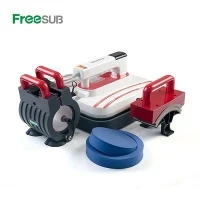
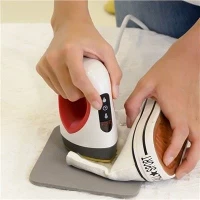
If you’ve ever been mid-sublimation project, loading skinny tumblers for a big client order, only to plug in your cup press and realize it’s not heating—you know that sinking feeling. As a sublimation cup press supplier, I’ve fielded this exact problem from so many small business owners, side hustlers, and even new etsy sellers over the last few years. It’s not just a “little inconvenience” when you’ve got 50 tumblers to deliver by Friday, right? The good news is that 9 times out of 10, this issue is way easier to fix than you think—no need to call a fancy technician or drop hundreds on a new machine. Let’s walk through every step, simple and straightforward, like I’d walk you through it over a quick text or a troubleshooting call.


First, let’s start with the most obvious (and most overlooked) stuff—seriously, I swear 30% of the time this is all it is. If your mug press for skinny tumblers won’t heat, stop overcomplicating it and check the basics first. I can’t tell you how many times a customer has emailed me panicking, only to reply 10 minutes later like “oh, the plug was loose in the wall!” Yeah. That’s real. Let’s break this down: first, is the machine actually plugged in? I know, you thought you did that, but sometimes when you’re juggling heat tape, sublimation paper, and a tumbler, you fumble the plug and it’s halfway out. Next, check the outlet. Try plugging something else you know works—like your phone charger or a lamp—into the same socket. If that doesn’t turn on, the outlet’s dead, not your press. If that’s fine, check the power cord itself. Look for any frayed spots, kinks, or chewed bits (pro tip: if you have pets, this is a common thing—dogs love to gnaw on cords). If the cord feels sketchy, don’t risk plugging it in; reach out, but skip using a random extension cord too—those can mess with power flow.
Okay, so you checked the plug, outlet, and cord, and everything looks good. Next up is the control panel—this is where a lot of new users mess up, because different mug press heat machine models have slightly different settings. Wait, did you actually turn the heat up? I’ve had so many first-time operators set it to 180 degrees, leave it there, and wonder why it never gets to the 400°F needed for sublimation. Also, some presses have a “standby” mode, or take 5-10 minutes to warm up when you first turn them on (especially if you stored them in a cold garage or basement). If your machine has an indicator light, is the heat light on? If it’s flickering or only coming on for a second then going off, that’s a clue we need to dig deeper, but let’s not jump to big problems yet. Another control panel thing: some models let you lock settings so they don’t get bumped mid-project. If your numbers are unresponsive, maybe someone accidentally locked it—check the user manual (hey, I always tell my customers to keep that on hand, it’s worth a quick 2-minute scan).
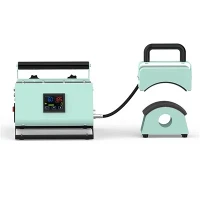
Now, if all the basic checks pass, it’s time to get a little more hands-on, but still simple. Let’s talk about the heating element itself. Most coffee cup press machines have a silicone or rubber interior that wraps around the tumbler, and the heating element is inside that. Wait—did you leave something stuck in there? I once had a customer who put a piece of scrap sublimation paper inside the press and turned it on, and it melted a little, creating a barrier. That’ll definitely stop heat from getting to your tumbler. Unplug the machine (always do this before sticking your hands inside!), then gently feel around the interior for any bits of paper, tape, or lint. If you spot melted plastic from old projects, wipe it with a soft cloth and a little rubbing alcohol—just make sure it’s totally dry before using the press again.
If that’s not it, let’s test the temperature accuracy, because sometimes the control panel says it’s at 400, but it’s actually way lower. Here’s a trick I share with everyone: grab an oven-safe meat thermometer (not a candy thermometer, those go too high) and turn your press to the max temp. Stick the probe in the center of the heating element, close the press, and wait 10 minutes. If it reads 50-100°F lower than the panel says, that’s the issue—most of the time, that’s a simple calibration fix, not a broken machine. A lot of new mug cup heat press machines ship with default settings that are a little off, and you can tweak that in the control panel or by following a quick step in the manual. If it’s way lower than that, or not heating at all, that’s when we start looking at internal parts, but don’t worry—it’s still rarely a total replacement.
Wait, let’s talk about the thermostat next—this is the part that regulates heat and tells the element when to turn on and off. Thermostats are pretty durable, but they can go bad over time, especially if you’re using your press 5+ times a day. Signs your thermostat is shot: the machine keeps getting too hot or too cold randomly, or it’ll never reach temp no matter what. How to tell if it’s the thermostat? If you know a little about basic electronics, you can test it with a multimeter (just make sure the machine is unplugged and cooled down first). If you don’t feel comfortable with that, don’t mess around—messy wiring is how people get hurt, and I’d rather you be safe. Most of the time, thermostats are super easy to replace, too—most F270 Heat Transfer Mug Printing Machine Tumbler Machine models, for example, have a user-replaceable thermostat that takes 5 minutes with a screwdriver, no tools you don’t have at home.
One more common issue that people don’t think about: power surges or electrical overloads. If you had a storm recently, or another big appliance (like a fridge, microwave, or even a space heater) was on the same circuit as your press, that could’ve blown a fuse in your machine. A lot of sublimation cup presses have a small reset button or a fuse on the back or bottom panel—you just have to unscrew a tiny cover and check. It’s a glass fuse, really common, and they’re cheap to replace if it’s blown. Pro tip: if you have a surge protector, plug your heat press into that—no more random surges ruining parts, which saves you a ton of hassle long-term.
Wait, let’s make sure I’m not missing anything—what if you’re using a custom mug press? No, this works for almost all models, whether you’re using a skinny tumbler or a standard coffee mug. I’ve even helped people with off-brand presses fix the heating issue using these exact steps, so it’s not just for the machines we sell (though obviously, our lineup is top-tier). Here’s a quick recap of the steps to run through, in order, so you don’t skip anything: 1) Check plug, outlet, and power cord; 2) Verify control panel settings (temp, standby, lock mode); 3) Clear any debris from the heating interior; 4) Test temp accuracy with a meat thermometer; 5) Check for a blown fuse or reset power surge; 6) Test the thermostat if all else fails.
Now, let’s be real—sometimes even after running through all these steps, you still can’t get your press to heat. That’s not a failure on your part or mine, that’s just how machines go sometimes. If that happens, don’t try to take the whole thing apart yourself—you can break something that was still working, or worse, get shocked. Instead, reach out to your supplier (that’s me, hi!) and tell them what you’ve already checked. I always tell my customers that as long as you walk me through the steps you already did, we can narrow it down in 2 minutes, no guesswork. I’ve been doing this long enough that I can usually tell if it’s a fuse, a thermostat, or a more rare issue just from hearing what you’ve tested, and most parts take 2-3 days to ship so you’re not stuck waiting forever.
Here’s the thing I always say to new sublimators: troubleshooting your press not heating is one of those “learn once, use forever” things. You don’t have to be an electrician to fix 90% of these issues, and knowing these steps means you won’t panic when that big order comes in and something goes wrong. Whether you’re using a Mug press for skinny tumblers for your tumbler side hustle, or a standard Coffee cup press for custom mugs, these steps apply. I’ve sold thousands of Mug press heat machine over the years, and the most common complaint by far is the “not heating” issue—and almost all of them are fixed with the steps I laid out today.
If you’re in the market for a new press, or need parts for the one you already have, don’t hesitate to reach out. I don’t do pushy sales pitches—just tell me what you need, how many tumblers or mugs you’re printing a week, and I’ll hook you up with the right machine at a fair price. Whether it’s a basic Mug Cup Heat Press Machine for beginners, or the heavy-duty F270 Heat Transfer Mug Printing Machine Tumbler Machine for folks running full-time businesses, I’ve got you covered. I also offer free troubleshooting tips over chat for any machine, even if you didn’t buy it from me—no strings attached, because I just love seeing other people’s sublimation businesses do well.
At the end of the day, a press not heating is just a little hiccup, not a death sentence for your order or your side hustle. Take it step by step, don’t skip the obvious stuff, and if you hit a wall, I’m here to help. Happy pressing!
References:
- Sublimation Heat Press Troubleshooting Guide, Heat Transfer Printing Association, 2023
- Common Malfunctions in Digital Mug Press Machines, Journal of Commercial Printing Equipment, Vol. 18, No. 2, 2022
- Electrical Safety Guidelines for Small Business Heat Press Operators, Occupational Safety and Health Administration (OSHA), 2024